Free Barcode Label Generator — Sequential & Custom Labels
Create a run of sequential barcode labels, or one custom label, and print them straight from your browser.
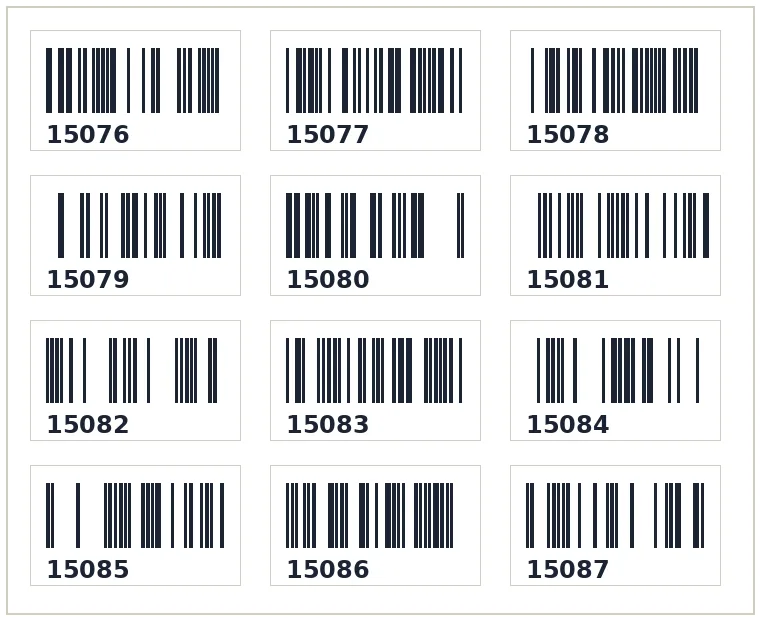
100% free · no upload · no sign-upThe SKUStamp barcode label generator is a free barcode label maker for resellers and small warehouses. Create a whole run of sequential barcode labels — 15076, 15077, 15078 and so on — or type your own custom SKUs, choose a label size, and print. It builds standard Code 128 barcodes that scan with any phone app or handheld scanner, and it runs entirely in your browser with no sign-up and nothing installed.
Barcoding your stock is what turns a pile of items into a system you can actually search. Give every item a SKU, print a barcode label, and you can scan it to find the listing, check the cost of goods, or confirm the right parcel is going to the right buyer — whether you sell on Vinted, eBay or Depop.
What the barcode label maker does
- Sequential barcode label generator — set a start number and quantity and it counts up for you.
- Custom barcode labels — type any codes or SKUs and generate a label for each.
- Choose a label size — the same size presets as the SKUStamp app, from small SKU stickers to 4×6.
- Scannable Code 128 — sharp, standard barcodes that read reliably.
- Runs in your browser — free, private, no upload and nothing stored.
Most barcode software is aimed at big retailers and comes with a subscription. This tool is deliberately simple: pick sequential or custom, set the size, and print. It's ideal for numbering a rail of clothing, labelling storage bins, or printing a fresh strip of SKUs before a listing session. Because the barcodes are Code 128 you can scan them with a cheap USB scanner or a free phone app, so you don't need any special hardware to get started.
How to create sequential barcode labels
- Choose sequential and enter a start number (for example 15076).
- Set the quantity — how many labels you need in the run.
- Pick a label size to match your sticker sheet or thermal printer.
- Download & print the sheet of barcodes, ready to peel and stick.
For one-off items, switch to custom mode and type the exact SKU you want on the label. Either way the number is printed big and bold above or below the barcode so it's still readable by eye, which makes picking and stock-checks faster even without a scanner in hand.
Who it's for
- Vinted & Depop sellers numbering stock by SKU
- eBay sellers running an inventory system
- Market & car-boot sellers pricing by code
- Storage & warehouse staff labelling bins and shelves
Anyone who needs to find an item again quickly benefits from a barcode. Pair these labels with the SKUStamp app or your own spreadsheet and a quick scan tells you what an item is, what it cost and where it should go.
Label sizes & uses
Match the label to your printer and job — small SKU stickers for garments, larger labels for boxes and bins, or a full 4×6 for parcels. The generator uses the same size presets as the SKUStamp desktop app so your free labels and your in-app labels look identical.
A sheet of sequential barcode labels
Frequently asked questions
How do I create sequential barcode labels?
Open the barcode label generator above, choose sequential mode, enter a start number such as 15076 and the quantity you need. Pick a label size to match your sticker sheet or thermal printer, then download and print. The tool counts up automatically, so a run of a hundred SKUs takes one click, and every barcode is a standard scannable Code 128.
What barcode format do you use?
Every label is a Code 128 barcode, the most widely supported format for SKUs and stock. Code 128 is compact, high-density and reads reliably with handheld scanners and free phone scanning apps, so you don't need any special equipment. The human-readable number is also printed on the label so you can pick by eye when you need to.
Can I choose the label size?
Yes. The generator offers the same size presets as the SKUStamp desktop app — from small SKU stickers for clothing up to a full 4×6 label — so your free labels match your in-app labels exactly. Choose the size that fits your label sheet or thermal printer before you download the print sheet.
Are the barcodes actually scannable?
Yes. The barcodes are generated as crisp vector Code 128, not blurry images, so they stay sharp at any print size and scan first time. As long as your printer isn't running low on ink or ribbon, they'll read with a normal scanner or a phone app straight off the page.
Is the barcode label maker free?
Completely free, with no sign-up and no watermark. Generate as many sequential or custom barcode labels as you like, entirely in your browser. Nothing is uploaded and nothing is stored, so your SKUs stay private to you.