Free PDF Label Stamper — Add SKUs to Shipping Labels
Stamp a SKU, order number or any text onto one label or hundreds — right in your browser.
100% free · no upload · no sign-upThe SKUStamp PDF label stamper is the fastest way to add a SKU to a shipping label — no design software, no account and nothing to install. You upload your label PDF, drag a text box to a clear spot, type your SKU or order number, and download a print-ready label in seconds. It works with the labels you already download from Royal Mail, Evri, InPost and DPD, and it's built for Vinted, eBay and Depop sellers who need to match every parcel back to the right listing. Because everything runs in your browser, your label never leaves your computer.
Stamping the SKU straight onto the shipping label is the small habit that stops the most expensive reselling mistake: sending the wrong item to a buyer. Instead of squinting at an order screen or scribbling a code on a thermal label by hand, you get a clean, printed reference on the label itself — so when you pick, pack and post, the parcel and the listing always line up.
What the label stamper does
- Add SKUs to shipping labels — position the text once and it stamps in the same place on every label.
- Batch stamp PDFs — one multi-page PDF or several files, all stamped in a single download.
- Stamp any text — SKUs, order numbers, buyer initials or storage bin numbers.
- Works in your browser — no upload, no server, nothing stored. Your labels stay private.
- Print-ready output — the original label quality is preserved, ready for a 4×6 thermal printer or A4 sheet.
Unlike heavy design software, this tool is built specifically for eCommerce shipping workflows. Whether you're a Vinted seller dispatching five parcels a week or a small warehouse processing hundreds of DPD labels, the batch stamper saves you from handwriting SKUs onto thermal labels one by one. The text positioning is persistent, so you only set the layout once and every label in the batch is stamped in exactly the same place. And because it's browser-based, there's nothing to download and it works the same on Windows, Mac, a Chromebook or a tablet.
How to add a SKU to a shipping label
- Upload your label PDF — drag in one file or several at once.
- Position the text box — drag it to a blank area of the label. That spot is reused on every label.
- Type the SKU — enter the SKU or order number for each label as you flick through them.
- Download — get your stamped, print-ready PDF instantly.
The whole flow takes a few seconds per label, and far less once you're in a rhythm. Because you set the position first, a run of twenty labels is really just twenty quick SKU entries and one download. There's no login step to slow you down and no file-size limit to worry about — most shipping label PDFs are tiny, so even a big batch stamps almost instantly.
Who it's for
- Vinted sellers matching parcels to listings
- eBay sellers stamping order numbers on labels
- Depop sellers keeping stock organised
- Warehouse & storage staff labelling by bin
If you sell across more than one marketplace, a printed SKU is what ties everything together. It lets you reconcile a posted parcel against your inventory, find the item on a shelf by its bin number, and handle returns without guessing which listing a label belonged to.
Supported labels & platforms
The stamper works with the shipping label PDFs you already download from your courier and marketplace — there's no special format and nothing to convert:
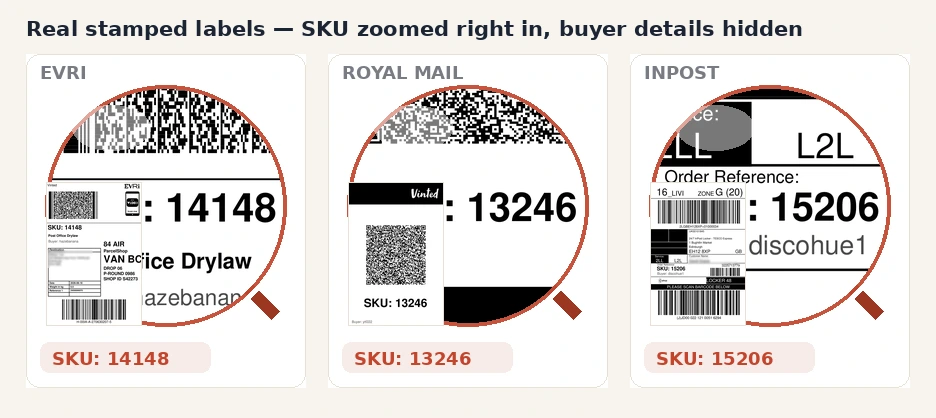
Whether your label came from a Vinted QR-to-PDF, an eBay postage label or a Royal Mail Click & Drop export, you can drop it straight in. The tool leaves the courier's barcode and address block untouched and simply adds your text on top, so the label still scans cleanly at the depot.
See it in action: the SKU stamped on real shipping labels
Frequently asked questions
How do I add text to a PDF shipping label?
Open the PDF label stamper above, upload your shipping label PDF, then drag the text box to a clear area of the label. Type your SKU or order number and download the finished PDF. The whole process runs locally in your browser, so your label is never uploaded to a server, and the original barcode and address stay sharp and scannable.
How do I put a SKU on a Royal Mail label?
Open the PDF label stamper above, upload your Royal Mail shipping label PDF, and drag the text box to a clear area — usually above the barcode or in the top-right corner. Type your SKU or order number and download the edited PDF. The tool runs locally in your browser, so your Royal Mail label is never uploaded to any server. The same steps work for Evri, InPost and DPD labels.
Can I stamp lots of labels at once?
Yes. The batch stamper supports multi-page PDFs and multiple file uploads. Upload all your shipping labels at once, position the text box a single time, and the SKU is stamped in the exact same spot on every page. Type the SKU for each label as you flick through them, then download one combined PDF with all the stamps applied.
Is the PDF label stamper really free?
Yes, completely free. There are no hidden charges, no credit card required and no sign-up. You can stamp as many shipping labels as you need, entirely in your browser, with no limits and no watermark added to your labels.
Will stamping the label affect the barcode?
No. You choose exactly where the text sits, so you can place the SKU on a blank part of the label well away from the courier barcode and QR code. The stamper only adds your text on top of the existing PDF — it never rescales, recompresses or moves the original label, so it still scans perfectly at the depot.